
The PlayStation 5 is still one of the leading consoles as of writing this article. In this article, we will discuss more fun ways on how you can enjoy playing games on your PS5. Curious about how this works? Let's dive right in!
The Usual and Traditional Way: Console + TV or Gaming Monitor
This is by far the most common way to play with your PS5. Well, actually, this console is built this way—to enjoy gaming on your couch or your comfortable space and experience the immersion.
It would be great if your console is Pro and your TV or monitor is fairly new, because you can also maximize the graphics.
Via Handheld: PlayStation Portal
This is the current trend nowadays—playing on the go. People nowadays are too busy with too many things, and we gamers find less and less time to sit down and play.
Good thing PlayStation released the PlayStation Portal to address this, but take note that this is just a remote player and requires a strong internet connection, plus it has some limitations depending on your location.
Related article: Why I Chose PS Portal
My use case:
- I'm playing mostly at home
- I have limited space
- Our TV is always being used by my kids
- I have a huge library of games on my PlayStation account
So this is perfect for me.
But many gamers find it hard to connect to their home internet despite having fast speeds, so this device isn't a 100% solution to gaming handheld needs—but it's still one of the exciting ways to play! I hope they release a standalone handheld gaming device soon. I'm so used to PS buttons that switching to PC or Nintendo controls always throws me off. 😅
Immersive: AR Glasses and Console
I stumbled upon this by accident, and I discovered that I can play my PS5 using AR glasses—specifically, wearable displays like the XREAL Air glasses. These lightweight glasses connect via USB-C to compatible devices and create the feeling of a massive virtual screen right in front of your eyes.
The Playstation does not natively support AR Glasses
Since the AR glasses were pretty new technology, our PS5 does not have display port enabled on their Type-c slots. Unfortunately, you need to buy another device in order for this to work.
This is what I bought: Lemorelle LD48 HDMI to USB C adapter.
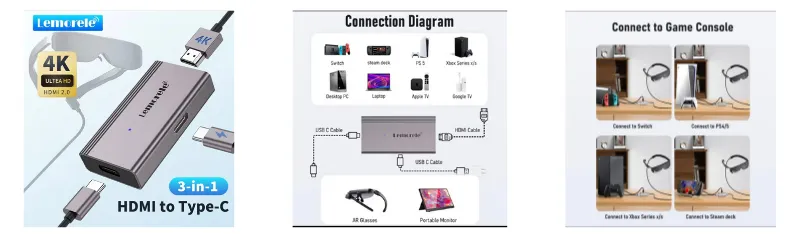
Once I have this, I was able to play my favorite games via my glasses, and the result blew me away. It felt like having a personal 201-inch cinema screen that only I could see. The immersion is on a completely different level compared to a regular TV setup. I also didn't experience any lags or delays at all! Add a noise-cancelling headphones, and you're in for an amazing treat!
Now, it's not perfect—the glasses can feel hot after a while and the field of view has its limits. But as a way to enjoy a private, distraction-free gaming experience without bothering anyone at home? It's genuinely one of the most exciting ways I've played my PS5. Give it a try if you get the chance! 😄
Another thing that I notice is there will be plenty of wires, but that's fine with me. I'm not entirely bothered with it because my view is on the glasses
Via PS Remote Play on My Phone, Then AR Glasses
This one is for the adventurous gamers out there. 😄 I discovered this when a fellow gamer shared his experience with the AR glasses, and he experimented with his phone by installing the RemotePlay app.
Here's the setup: instead of using my Playstation console, I use the PS Remote Play app on my phone. I connect my DualSense controller to the phone via Bluetooth, then plug the AR glasses into the phone via USB-C. The result is a fully portable PS5 gaming experience that fits in my bag.
There are a couple of things to keep in mind. First, your phone needs to support video output via USB-C (DisplayPort Alt Mode)—not all phones have this, so check your model first. Second, the battery drain is real when you're streaming and powering the glasses at the same time, so keep a power bank handy.
But when everything clicks together? It feels like the future. Picture being on a long commute and playing your PS5 games through a giant virtual screen that only you can see. The kind of setup that makes people around you wonder what you are doing.😁
In Summary
The PlayStation 5 is far more versatile than most people realize! Whether you're a classic gamer who loves the couch-and-TV combo, a busy gamer who needs portable options, or a tech enthusiast ready to try AR glasses—there's a setup for everyone.
Here's a quick recap:
- Console + TV/Monitor – The classic, most immersive setup
- PlayStation Portal – Perfect for home use when the TV is occupied
- AR Glasses + Console – Personal cinema mode, surprisingly immersive
- PS Remote Play + Mobile phone / tablet + AR Glasses – The portable, futuristic setup, easy to use
Which way to play excites you the most? Let me know in the comments! 🎮
Recommended Reading:
How to use Laptop as a Monitor for PlayStation (Remote Play)




.png)