
The PlayStation Portal has been one of the most talked-about PlayStation accessories since its launch — and also one of the most misunderstood! Some gamers dismissed it as "just a streaming screen," while others swear it's the best purchase they've made for their PS5. So which is it? Today, we're giving the PS Portal a proper review and breaking down everything you can actually do with this handheld device.
If you've been eyeing this gadget and wondering whether it deserves a spot in your gaming setup, this one's for you. Let's jump right in!
What Exactly is the PlayStation Portal?
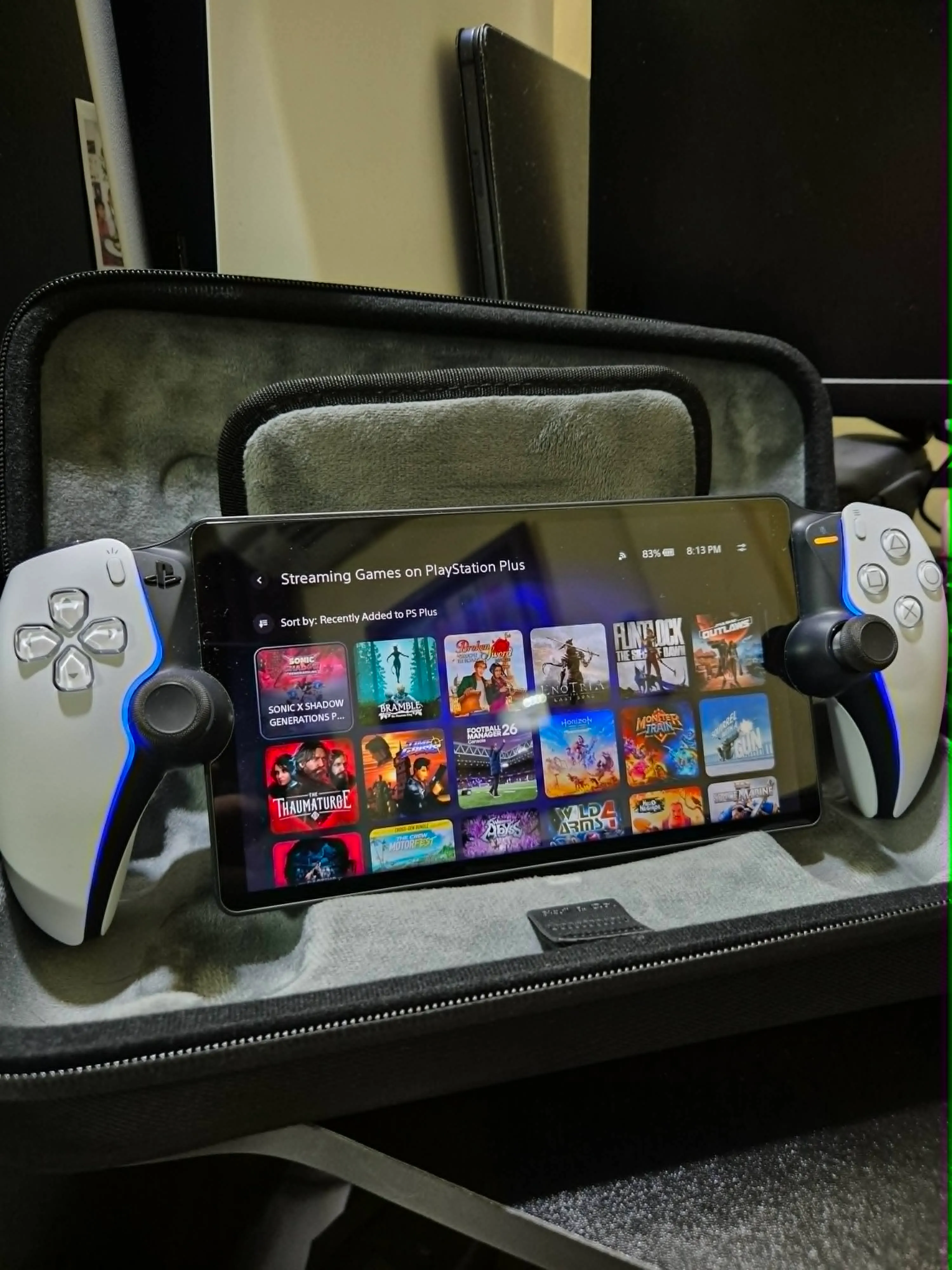
First, let's clear up the biggest misconception: the PlayStation Portal is not a standalone handheld console like the Nintendo Switch or the Steam Deck. It doesn't run games on its own hardware. Instead, it's a remote play device — an 8-inch LCD screen flanked by two halves of a DualSense controller, designed to stream games from your PS5 over Wi-Fi.
Think of it as your PS5's best friend: a window into your console that you can carry around the house (and beyond, if your internet cooperates).
The Hardware: That DualSense Feel
The first thing you'll notice when you hold the Portal is how premium it feels. Because the grips are literally DualSense halves, you get the full PS5 controller experience:
- Haptic feedback — the same immersive rumble you feel on your PS5 controller
- Adaptive triggers — yes, the tension when drawing a bow in Horizon or firing a gun in Returnal works here too
- Full-size sticks and buttons — no cramped, shrunken controls like some other handhelds
The 8-inch LCD screen streams at up to 1080p and 60fps. Is it OLED? No. Is it still sharp, bright, and gorgeous for gaming in bed? Absolutely.
Everything You Can Do With the PS Portal
Now for the main event — here's what this device can actually do:
1. Remote Play your PS5 anywhere in the house
This is the bread and butter. Someone hogging the TV for a teleserye marathon? No problem. Lie down in bed, fire up the Portal, and continue your game exactly where you left off. Your PS5 does all the heavy lifting while the Portal streams the action. The freedom this gives you is honestly life-changing for family households.
2. Play away from home
Here's something many owners don't realize: the Portal isn't limited to your home Wi-Fi! As long as your PS5 is in Rest Mode with remote play enabled, you can connect from anywhere with a decent connection — a coffee shop, your office during lunch break, or a hotel on a business trip. Sony recommends at least 5 Mbps, but for a smooth experience, aim for 15 Mbps or higher.
3. Stream games from the cloud (no PS5 required!)
A major update added cloud streaming for PS Plus Premium members. This means you can stream a huge catalog of PS5 games directly from Sony's servers — without even turning on your console. This single feature transformed the Portal from a companion accessory into something closer to a true handheld experience.
4. The full DualSense experience on the go
Games designed around haptics and adaptive triggers — Astro's Playroom, God of War Ragnarok, Ghost of Tsushima — feel just as immersive on the Portal. This is something phone-plus-controller remote play setups simply can't replicate.
5. Audio your way
The Portal has built-in speakers that are surprisingly decent, plus a 3.5mm headphone jack (something many modern devices have abandoned — thank you, Sony!). It also supports PlayStation Link wireless audio with compatible earbuds and headsets for lag-free sound.
What the Portal CAN'T Do
Let's keep it real — no review is complete without the limitations:
- No native games. Everything is streamed; there's no onboard game processing.
- No Bluetooth audio. Standard Bluetooth headphones won't pair; you need PlayStation Link devices or wired headphones.
- Internet dependent. Weak Wi-Fi means input lag, stuttering, or disconnections. For us here in the Philippines where internet quality varies, this is the biggest consideration before buying.
- No TV output. The Portal is personal-screen only.
Tips to Get the Best Experience
From one gamer to another, here are some tips to maximize your Portal:
- Connect your PS5 to your router via LAN cable — this dramatically improves stream stability.
- Use the 5GHz Wi-Fi band for the Portal, not 2.4GHz.
- Position your router near where you usually play, or invest in a mesh system.
- Keep your PS5 in Rest Mode so you can wake it remotely anytime.
- Make sure that there's enough bandwidth, ay will not get interrupted.
Is the PlayStation Portal Worth It?
Here's my honest take: the PS Portal is a fantastic device for the right person. If you specifically love PlayStation, share your TV with family, love gaming in bed, or want to squeeze in gaming sessions anywhere in the house, it's worth every peso. The DualSense features, comfortable ergonomics, and that crisp 8-inch screen make remote play feel premium rather than like a compromise.
Personal opinion: YES, IT'S WORTH IT! The games I finished this year are the testament to how much I enjoy this device!
But if you're looking for a standalone handheld to play games on a long trip with no internet, this isn't that device — look at a Steam Deck or Switch instead. The Portal is an extension of your PS5, not a replacement for it.
Final Verdict
The PlayStation Portal does one thing, and it does it exceptionally well: it sets your PS5 free from the TV. Add in cloud streaming for PS Plus Premium members, and the value proposition keeps getting better. For busy adult gamers juggling family time and backlogs (fellow tito gamers, I see you!), the Portal might just be the accessory that keeps your gaming life alive.
Do you have a PS Portal? What's your experience been like — smooth sailing or laggy nights? Share your thoughts in the comments below!
Recommended Reading:




.png)